
The Schema Lifecycle
A schema is not written once. It is read by people who did not write it, changed under consumers who depend on it, and eventually migrated. These are the features for the second half of that life.
Reading: the outline
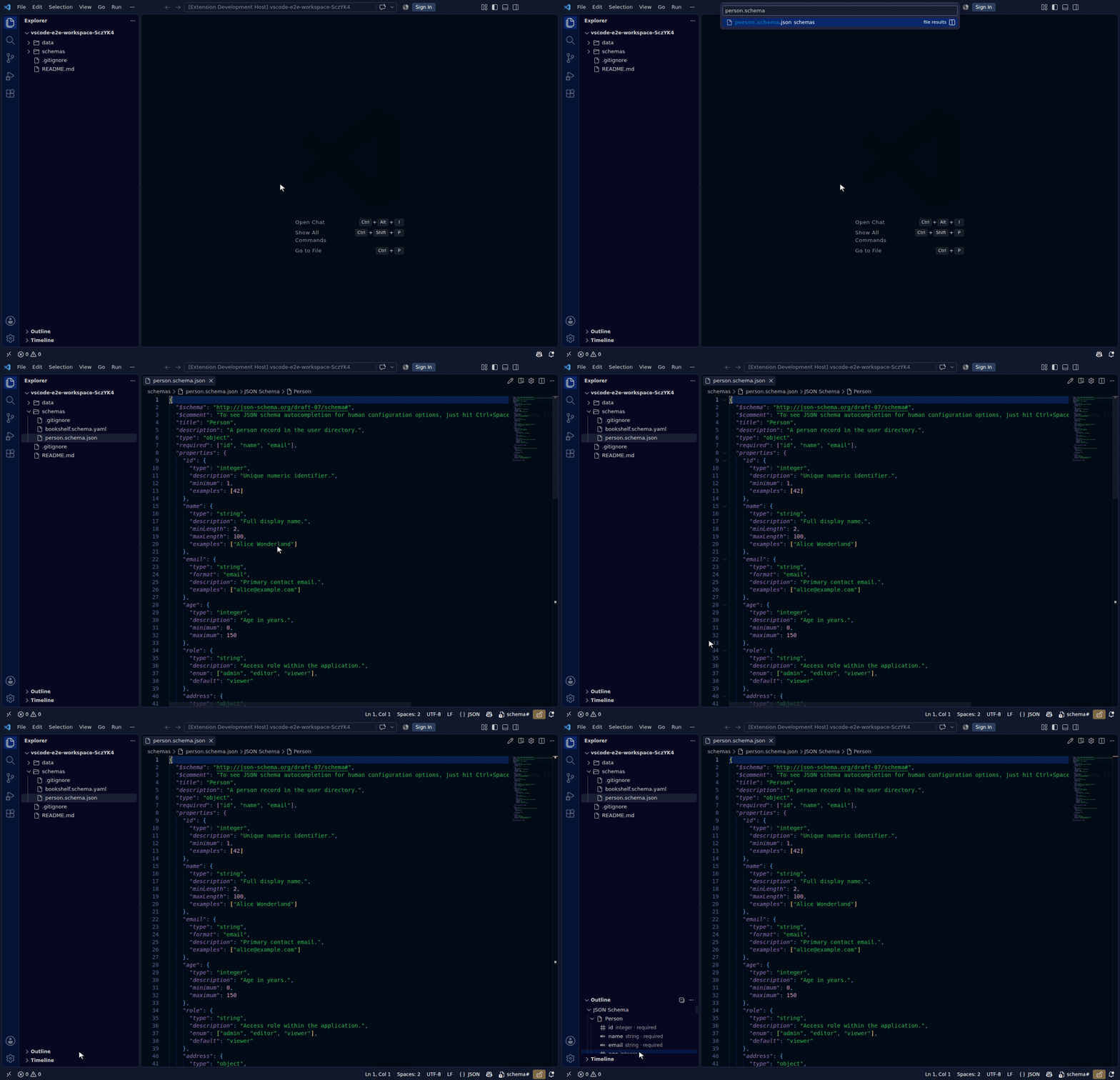
VS Code's Outline view, breadcrumbs, Go-to-Symbol (Ctrl+Shift+O) and sticky scroll all show the schema's shape rather than the document's: a property, its effective type, and whether it is required — not a chain of properties → key → type nodes.
- Nested object schemas nest correspondingly; an array's element properties appear under the array's own symbol.
- Properties declared inside
allOf/anyOf/oneOfbranches appear at the object they effectively belong to. - A
$refproperty shows its target as detail and is not expanded — follow it with Ctrl+click instead. That is also what keeps a recursive schema's outline finite. $defs(ordefinitions) appears as one section, so a definition-heavy schema is navigable without hunting for them.
Nothing to configure: it is a document-symbol provider, active on any file recognised as a schema.
Restructuring: refactorings
Every editor refactors code; none of them understand a schema. Restructuring one by hand is text surgery whose mistakes are silent — a stale local $ref still resolves, so the schema stays valid while meaning something different.
These operate on the parsed document and produce minimal text edits, so formatting and comments outside the edited span survive.
| Refactoring | How to reach it | What it does |
|---|---|---|
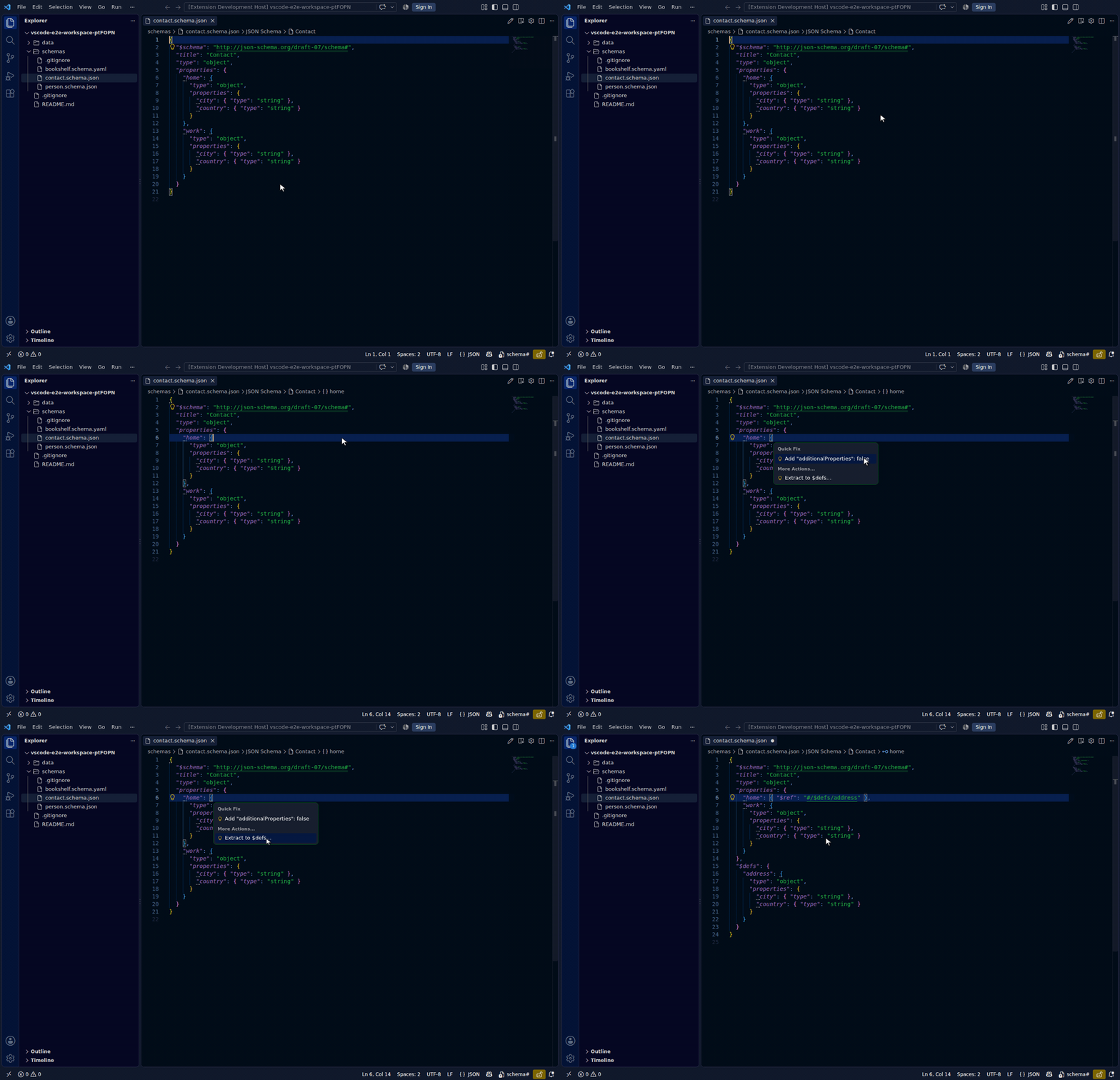
Extract to $defs | Refactor code action inside an object subschema | Moves it into $defs under a name you choose, leaving { "$ref": "#/$defs/<name>" } behind |
Inline a $ref | Refactor code action on a local $ref | Replaces it with the definition's text |
| Rename a definition | F2 on a $defs key or on a $ref to it | Rewrites the key and every reference, including refs that point into it |
 | Find all references | Shift+F12 | Every local
 $ref targeting the definition | | Remove unused definitions | Refactor code action | Deletes definitions nothing reaches |
Two behaviours are worth knowing:
Refusals are deliberate. Inline refuses a non-local $ref (that is bundling's job), an unresolvable pointer, a recursive reference, and a $ref carrying sibling keywords — merging those has draft-dependent semantics. Refusing keeps the guarantee total: a refactoring never changes which documents the schema accepts.
"Unused" is transitive. A definition referenced only from another unreachable definition is itself unused. A plain reference count would keep both alive forever; reachability from the root does not.
Unused definitions also show as dimmed hints on their key, the way unused code does.
Refactorings are JSON/JSONC only. Offset-accurate structural edits over YAML's block/flow forms, anchors and comment attachment are a materially different problem.
Guarding: schema tests
Validation answers "is this document valid?". A schema author needs the other question: "does my schema still accept what it should, and still reject what it shouldn't?"
Put the answer in a *.schema.test.json file next to the schema:
{
  "schema": "./person.schema.json",
  "description": "The person contract as consumed by the billing service.",
  "valid": [
    { "name": "minimal", "instance": { "name": "Ada" } },
    { "name": "from a fixture", "file": "./fixtures/ada.json" }
  ],
  "invalid": [
    { "name": "name is required", "instance": {}, "errors": ["required"] },
    { "name": "age must be a number", "instance": { "name": "A", "age": "x" } }
  ]
}
A case is either a descriptor (an object with instance or file, plus an optional name and, for invalid cases, expected errors) or a bare instance — any other value. The presence of instance/file is the only discriminator, so a document that happens to have a name property is never mistaken for test metadata.
errors is what stops a test passing for the wrong reason. An invalid case declaring errors: ["type"] whose instance actually fails required fails, and the message names what was reported. Without that, a test can keep passing long after the constraint it was written for has gone.
A suite's schema and its cases' file paths come from the suite document, not from anything you named, so they are confined to the workspace: a path that resolves outside it is refused and reported rather than read. A suite committed to a repository cannot make the extension open ../../../../etc/passwd.
Run them three ways:
- In the editor — JSON Schema: Run Schema Tests. On a suite file it runs that suite; on a schema file it runs every suite guarding it. Failures land as errors on the failing case.
- In the workspace sweep — Validate Workspace discovers suites, runs them, and folds the counts into its summary.
- In CI —
npx json-schema-toolkit test contracts/*.schema.test.json(exit0all pass,1a failure,65a malformed suite).
Changing: the compatibility verdict
Diff Against Baseline compares the schema against Git HEAD, another file, or a URL, and classifies every change as breaking, non-breaking, informational or unclassified — leading with a one-word verdict so you can answer "can I ship this?" before reading the details.
The same verdict is available two other ways:
Passively, while you edit. A CodeLens on the schema's first line reads 2 breaking changes vs HEAD, computed in the background from the same classifier. Turn it off with jsonschema.compat.codeLens. No baseline in Git, or no changes, means no lens rather than an empty one.
Headlessly, in CI:
npx json-schema-toolkit diff old.schema.json new.schema.json --check --strict
# exit 0 = compatible · 1 = breaking · 2 = unprovable (--strict only)
A typical PR check diffs the proposed schema against its base-branch version and fails the job on a non-zero exit.
Schema tests and the compatibility verdict answer the same question from different directions and neither subsumes the other: the verdict is structural ("did you narrow a type?"), the tests are empirical ("does the document my consumer actually sends still validate?"). Real regressions show up in one or the other, not reliably in both.
Migrating: drafts
Migrate to Draft… rewrites a schema between draft-07, 2019-09 and 2020-12, applying the well-known keyword changes in either direction and reporting how many it made. Anything it cannot safely convert is left untouched rather than guessed at, and the result opens in a new editor so the original is never modified.
Pair it with migration notes to turn the resulting diff into something your consumers can read.